

The main difference between ray-traced shadows and shadow maps comes down to how a graphics card checks whether light reaches a surface. Shadow maps render a 2D depth image from each light’s viewpoint, while ray-traced shadows shoot virtual rays through 3D geometry toward light sources. That choice changes edge sharpness, glitches, memory use, and frame rates.
How do shadow maps and ray-traced shadows work?
Shadow mapping is a two-pass rasterization technique introduced by Lance Williams at the New York Institute of Technology in 1978. In the first pass, your GPU renders the scene from the light’s perspective into a Z-buffer texture that records only distance values, skipping color and shading altogether.
In the second pass, the GPU renders the normal camera view, converts each visible pixel into the light’s coordinate space, and compares its distance against that saved depth map. If the pixel sits farther away than the depth stored in the map, something sits in the way and the pixel falls into shadow. Omnidirectional point lights cannot fit into one flat view, so engines generate cube map shadow maps made of six separate depth textures facing along each Cartesian axis, according to Stanford University’s graphics reference.
Ray-traced shadows throw out those per-light depth textures. Instead, the GPU maintains a 3D acceleration structure representing the scene’s geometry and casts virtual shadow rays from visible surface points straight toward each light source. If a ray hits another object before reaching the light, the surface sits in shadow; if the path stays clear, the surface stays lit.
Modern games rarely ray-trace an entire frame just to get better shadows. Most run hybrid pipelines where standard rasterization draws the scene while DirectX Raytracing (DXR) on Windows and Xbox, or Vulkan Ray Tracing (listed as Vulkan SM6 in Unreal Engine), calculates shadow visibility. Microsoft’s 2019 DXR Tier 1.1 update added inline raytracing through RayQuery under Shader Model 6.5, letting compute and pixel shaders fire shadow rays directly without dynamic shader tables.
To produce soft edges from physical area lights, a ray tracer fires multiple rays per pixel across the light’s physical width or angular spread. Unreal Engine controls that spread through Source Size on point, spot, and rectangle lights and Source Angle (defaulting to 0.5357 degrees) on directional lights, while Unity’s High Definition Render Pipeline (HDRP) models real sunlight with a 0.53-degree Sun Angle. Because firing dozens of rays per pixel would stall real-time frame rates, engines trace a few rays and pass the result through a spatio-temporal denoiser to smooth out grain.
| Feature | Traditional shadow maps | Virtual Shadow Maps (UE5) | Ray-traced shadows |
|---|---|---|---|
| Core method | 2D depth texture rendered per light | Cached 16k x 16k virtual depth pages plus shadow-map ray marching | Virtual rays tested directly against 3D geometry |
| Edge softness | Uniform sharpness or uniform blur across the shadow | Plausible contact hardening via Shadow Map Ray Tracing | Physically grounded contact hardening and distance-based penumbras |
| Common artifacts | Blocky edges, shimmering, shadow acne, Peter Panning | Single-projection limits compared to true 3D geometry | Low-sample noise, denoiser blur, or Nanite fallback mesh mismatches |
| Transparent casters | Opaque or alpha-cutout geometry only | Primarily opaque and masked geometry | Supports colored and semi-transparent shadows in pipelines like Unity HDRP |
| Main bottleneck | VRAM capacity and per-light rasterization passes | Page cache updates in fast-moving dynamic scenes | Ray count per pixel, denoising, and alpha-masked foliage |
Why do they look different on screen?
Real shadows stay razor-sharp right where an object touches the ground and grow softer as the distance between the object and its shadow increases. According to the Unreal Engine documentation, ray-traced shadows naturally reproduce this contact hardening because rays spread wider over longer distances. Standard shadow maps keep the same sharpness or blur along the entire shadow regardless of distance.
Because shadow maps store depth on a finite 2D grid, stretching that grid over a large outdoor area creates blocky, stair-stepped edges and shimmering borders whenever the camera moves. Developers reduce shimmering by shifting lights in texel-sized steps, as detailed in Microsoft’s DirectX documentation.
Precision limits in that 2D depth comparison trigger two classic glitches. Shadow acne appears as speckled, moiré-like stripes where a surface falsely shadows itself due to slight depth rounding differences. Developers fix shadow acne by adding a depth bias offset, though pushing that bias too high causes Peter Panning, where shadows detach from characters’ feet and make objects look like they float above the ground.
Transparent materials also separate the two approaches. Standard shadow maps store one depth value per texel, so Unity’s shadow manual notes that built-in transparent shaders cannot cast or receive them without falling back to opaque Transparent Cutout shaders. In contrast, the Unity HDRP manual shows ray-traced shadows passing through transmissive glass or tinted surfaces to cast semi-transparent, colored shadows.
Engine makers have spent decades narrowing the visual gap with upgraded shadow map techniques. Microsoft’s Cascaded Shadow Maps guide explains how splitting the camera’s view frustum into depth slices gives nearby objects high-resolution maps while pushing lower-resolution maps into the distance. Engines also tighten the light’s near clip plane through shadow pancaking, average neighboring depth tests with Percentage-Closer Filtering (PCF), or store depth-squared values in Variance Shadow Maps (VSMs), though VSMs can suffer from light bleeding where shadow casters overlap.
Unreal Engine 5 pushes shadow mapping even further with Virtual Shadow Maps, which moved out of beta in Unreal Engine 5.3. They run at a 16k x 16k virtual resolution, cache unchanged shadow pages between frames, and use Shadow Map Ray Tracing (eight rays by default at Epic shadow scalability) to approximate soft contact hardening. Even so, Epic Games notes that standalone ray-traced shadows still take precedence as the highest-quality option because Shadow Map Ray Tracing queries a single shadow map projection instead of actual 3D geometry.
How do ray-traced shadows and shadow maps compare on performance?
In scenes lit by a sun and a few local lamps, shadow maps stay fast, predictable, and compatible with every GPU. That efficiency explains why PC games expose granular shadow-map settings such as Shadow Quality, Soft Shadows, Dynamic Shadows, Contact Shadows, and Shadow Distance so you can dial in your preferred frame rate, as CORSAIR’s 2025 graphics breakdown outlines.
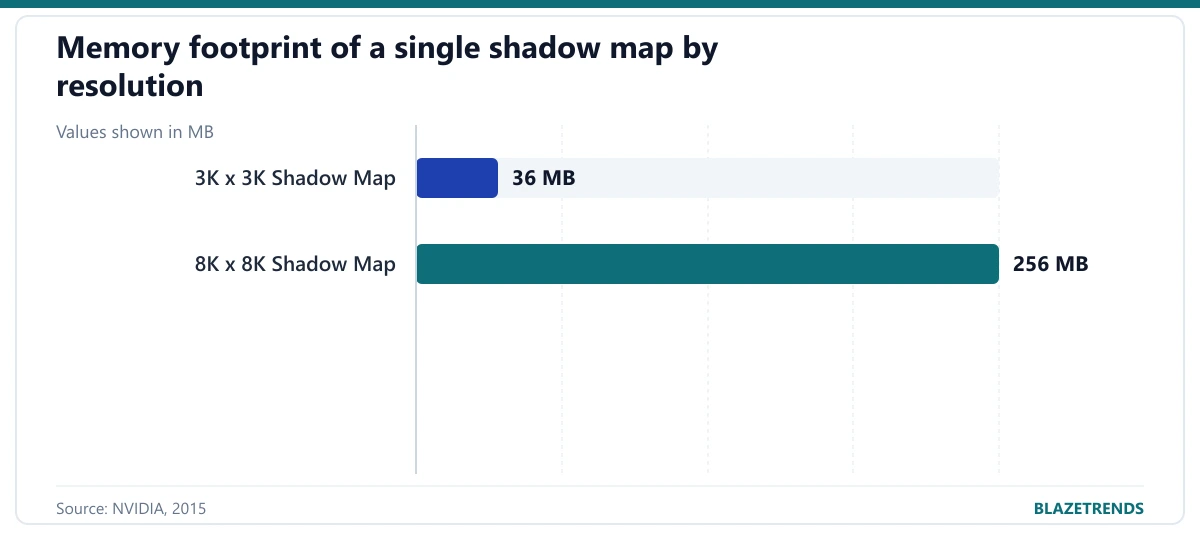
Pushing traditional shadow maps toward ray-traced sharpness comes with a steep VRAM bill. In NVIDIA’s 2015 Game Developers Conference breakdown of hybrid ray-traced shadows, a single 3K x 3K shadow map consumed 36 MB of memory, while stepping up to an 8K x 8K shadow map jumped to 256 MB. Multiply that across multiple cascades or six-sided point-light cube maps, and video memory fills up quickly.
Ray-traced shadows shift the pressure from texture memory to ray-tracing cores and shader compute. According to NVIDIA engineering guidance, execution cost climbs almost linearly with ray count, meaning doubling SamplesPerPixel from 1 to 2 nearly doubles the work (matching Unity HDRP’s Sample Count scaling). Dense forests or chain-link fences also slow ray tracing down because alpha-masked materials force the GPU to run expensive DXR Any Hit shaders.
That balance flips in scenes packed with dozens of dynamic shadow-casting lights. NVIDIA’s engineering notes point out that rasterizing separate dynamic shadow maps for every active light can end up far slower than firing ray-traced shadows directly. To keep frame times steady in busy scenes, Unity HDRP lets developers cap active screen-space ray-traced shadow lights with a Maximum limit and automatically fall back to shadow maps for any extra lights.
What common mistakes trip up players and developers?
One stubborn myth in 3D graphics is that you can create soft shadows simply by blurring a shadow map texture. Microsoft’s DirectX guide shows why that fails: blurring raw depth values before the pass-or-fail distance check still produces a razor-sharp cutoff, only shifted into the wrong position. Soft edges require filtering the test results afterward (as PCF does) or sampling rays across a physical light area.
Another misconception is that ray-traced shadows eliminate every visual glitch. Ray tracers still apply a tiny shadow bias to avoid floating-point self-intersection, and low ray counts leave grainy penumbras if settings like Denoise, Denoiser Radius, and Distance Based Denoising in Unity HDRP are poorly tuned. In Unreal Engine, standalone ray-traced shadows trace against a Nanite mesh’s lower-triangle Fallback Target mesh, which can introduce shape mismatches unless developers adjust that target.
If shadows look distracting while you play, knowing which system is running saves time in the graphics menu. Blocky or shimmering edges point to shadow maps, where raising Shadow Quality or reducing Shadow Distance sharpens nearby detail without turning on ray tracing. Floating shadows under feet stem from a developer’s depth-bias trade-off rather than faulty hardware, while heavy frame drops in leafy areas or blotchy dark gradients usually mean ray-traced shadows and their denoiser are overwhelming your GPU—switching back to shadow maps or Virtual Shadow Maps fixes that immediately.
Frequently asked questions
Are Unreal Engine’s Virtual Shadow Maps the same as ray-traced shadows?
No. Virtual Shadow Maps are still rasterized depth maps running at a 16k x 16k virtual resolution with page caching and Shadow Map Ray Tracing to mimic soft edges. True ray-traced shadows test rays directly against 3D scene geometry rather than a 2D shadow projection.
Why do shadows sometimes float away from a character’s feet?
That floating gap is Peter Panning, a shadow-map artifact caused by pushing the depth bias too high while trying to hide speckled shadow acne. Because ray-traced shadows check geometry directly instead of relying on a coarse depth texture, they avoid this detachment.
Do ray-traced shadows always lower frame rates?
In most games with one primary sun and a handful of local lights, turning on ray-traced shadows lowers frame rates because casting and denoising rays per pixel demands extra GPU work. In scenes with many dynamic shadow-casting lights, however, ray-traced shadows can actually cost less than rasterizing a separate dynamic shadow map for every light.