
Browser USB flashing works by pairing the browser’s Web Serial API with client-side JavaScript that talks directly to an ESP32 chip’s built-in ROM bootloader over USB. Once you select your board in a permission prompt, the webpage toggles reset signals, loads a temporary RAM stub, and writes compressed firmware blocks straight into flash memory without local developer tools.
ContentsToggle
How does the browser talk to an ESP32 over USB?
Web pages normally live inside a strict browser sandbox with no access to plugged-in hardware. The Web Serial API punches a controlled opening through that sandbox on HTTPS pages, letting JavaScript read from and write to serial ports through standard ReadableStream and WritableStream interfaces. Unlike raw WebUSB, which gets blocked when your operating system claims a USB-to-serial chip with a native driver, Web Serial sits above the OS serial stack so the browser can communicate smoothly.
A site can never silently scan your USB ports or detect what is plugged into your computer. When a flashing page calls navigator.serial.requestPort(), the browser requires a direct click or tap and opens a native device picker where you choose a single port. You can also revoke that permission later through the browser or the API’s forget() method, and all flashing work runs locally inside your browser tab so your firmware binaries stay on your machine.
Once the serial port opens, the webpage still has to tell the ESP32 to stop running its current sketch and wait for new code. Every Espressif chip ships with a permanent ROM bootloader burned at the factory that listens for firmware uploads whenever specific strapping pins are set during reset. According to Espressif boot mode documentation, holding GPIO0 low while resetting the board (with GPIO2 floating or low) boots the chip into Firmware Download mode.
To trigger that mode automatically, the webpage calls SerialPort.setSignals() to toggle two classic serial control lines: DTR (Data Terminal Ready) and RTS (Request To Send). Most ESP32 development boards wire those active-low lines through an auto-reset transistor circuit to GPIO0 and the chip’s enable pin (EN, or CHIP_PU), letting JavaScript pulse the reset sequence in milliseconds. Older boards route USB through an external bridge chip like Silicon Labs CP210x or WCH CH340, while newer chips such as the ESP32-S3 include a fixed-function USB Serial/JTAG Controller wired directly to GPIO19 and GPIO20 that handles download mode without an external bridge.
What happens during browser USB flashing on an ESP32?
With the chip waiting in Firmware Download mode, client-side JavaScript takes over the wire protocol. Most sites rely on Espressif’s esptool-js (at version 0.7.1 as of November 2026), an official browser port of the Python esptool utility that follows the esptool serial protocol. The workflow mirrors broader browser firmware flashing tools, starting at a locked 115200 bps (8 data bits, 1 stop bit, no parity) and sending SLIP-encoded SYNC packets (opcode 0x08) until the ROM bootloader responds and identifies the chip.
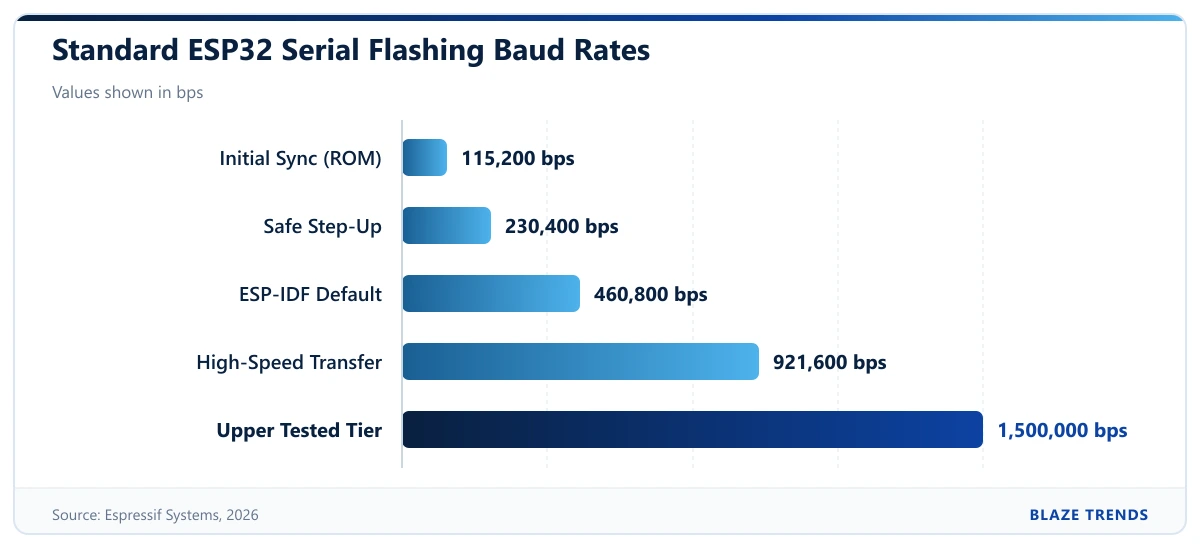
Next, the browser uploads a tiny program called the flasher stub into the ESP32’s internal RAM using MEM_BEGIN, MEM_DATA, and MEM_END commands (opcodes 0x05 through 0x07). Running that temporary stub in RAM replaces the fixed ROM loader for the rest of the session, adding faster UART handling, quicker flash reads, and workarounds for ROM quirks. Once the stub is active, the browser issues CHANGE_BAUDRATE (0x0F) to step up transfer speed from 115200 bps to 460800 bps (Espressif’s default in idf.py), 921600 bps, or up to 1500000 bps on capable hardware.
To keep uploads quick over serial, the flasher compresses firmware with zlib/gzip Deflate and streams it in 16 KB blocks using FLASH_DEFL_BEGIN (0x10) and FLASH_DEFL_DATA (0x11) commands. Those binaries land at specific hex offsets in SPI flash: the partition table sits at 0x8000 (4 KB aligned) and the factory app starts at 0x10000 (64 KB aligned), while the second-stage bootloader sits at 0x1000 on an original ESP32 and at 0x0 on newer chips like the ESP32-S3. After the final block lands, the stub checks a 16-byte MD5 hash of the written region and sends FLASH_END (0x04) so the board resets into your new firmware.
Manifest-driven installers hide all of those hex addresses from everyday users. ESPHome’s ESP Web Tools reads a JSON manifest through an esp-web-install-button element, detects your exact ESP chip family automatically, and grabs only the matching binaries—an approach widely used by projects like WLED and ESPEasy. Espressif’s own ESP Launchpad does the same thing with TOML configuration files for ESP RainMaker and Matter builds while keeping a DIY tab open for manual local .bin uploads.
How do you flash an ESP32 from a browser step by step?
The exact button names differ slightly between ESP Launchpad, ESP Web Tools, and custom project pages, though the sequence is identical on desktop Chrome (89+), Edge (89+), Opera (75+), Firefox (151+), and Chrome for Android (148+).
- Close any desktop app holding the serial port open, including Arduino IDE Serial Monitor, VS Code, idf.py monitor, or PuTTY.
- Plug the ESP32 into your computer or Android phone with a data-capable USB cable rather than a charge-only cable.
- Open the HTTPS flashing page, such as ESP Launchpad, and choose Quick Start for hosted firmware or DIY if you are flashing your own .bin files.
- Click Connect (or Install on ESP Web Tools pages), pick your board in the browser’s port chooser—often listed as USB Serial, CP210x, CH340, or USB JTAG/serial debug unit—and approve access. In Firefox 151 and later, also approve the site permission add-on prompt that appears for that site and port.
- If you are using DIY mode, select each .bin file and type its exact flash offset: 0x0 for a single merged binary or an ESP32-S3 bootloader, or 0x1000 for an original ESP32 bootloader, 0x8000 for the partition table, and 0x10000 for the app.
- Click Flash (or Program). If the log hangs while trying to sync, hold the board’s BOOT (GPIO0) button, tap and release EN or RST, and then release BOOT to force Firmware Download mode manually.
- Wait for the verification step and automatic reboot, then open the page’s built-in serial console at 115200 bps to confirm the new firmware boots cleanly.
Which browsers support ESP32 flashing, and why do flashes fail?
For years, browser USB flashing only worked in desktop Chromium browsers, though support broadened sharply in 2026. Mozilla shipped desktop Web Serial in Firefox 151 on May 19, 2026—gating each site behind a generated permission add-on and keeping it off by default in Firefox Enterprise Policies via DefaultSerialGuardSetting, as detailed in the Mozilla engineering announcement. On mobile, Google expanded Chrome for Android from Bluetooth-only serial ports in Chrome 138 (June 2025) to wired USB Web Serial in Chrome 148 in 2026, while Apple’s WebKit engine still formally opposes the API over USB vendor/product ID fingerprinting, raw byte-stream risks, and iOS serial limitations.
| Browser / Platform | Wired USB Flashing Support (as of 2026) | Notes and Limitations |
|---|---|---|
| Chrome 89+, Edge 89+, Opera 75+ (Desktop) | Supported | Works on Windows, macOS, Linux, and ChromeOS; check about://device-log for Chrome port diagnostics. |
| Firefox 151+ (Desktop) | Supported | Added May 2026; uses a per-site permission add-on and defaults to off under Enterprise Policies. |
| Chrome for Android 148+ | Supported | Adds wired USB serial support; Chrome 138 to 147 supported Bluetooth RFCOMM serial only. |
| Safari (macOS and iOS) | Not supported | WebKit formally opposes Web Serial; iOS does not expose serial ports to browsers. |
| Firefox for Android & Android WebView | Not supported | Requires switching to a supported desktop browser or Chrome for Android 148+. |
Even in a supported browser, hardware and OS quirks trip up a lot of first-time flashes. Because serial ports are exclusive and depend on physical wiring, most failures trace back to one of six causes:
- Power-only USB cables lack D+ and D- data wires, so the board’s power LED lights up while no port appears in the browser picker.
- Missing USB-to-UART drivers prevent Windows or macOS from creating a COM or /dev/cu port for boards with external CP210x or CH340 bridge chips; browser flashing removes Python installs, though OS serial drivers are still needed.
- Wrong bootloader offsets stop a newly flashed chip from starting, especially when mixing up 0x1000 (original ESP32) and 0x0 (ESP32-S3 and newer models).
- Missing EN-pin capacitors on some third-party ESP32 boards (under 1uF between EN and GND) break automatic DTR/RTS reset on Windows, requiring the manual BOOT-plus-RST button sequence.
- Native USB disconnects on ESP32-S3 boards happen if the currently running firmware enters Light-sleep or Deep-sleep or reassigns GPIO19/GPIO20; putting the board into download mode manually restores the /dev/ttyACM or COM port.
- Linux serial hang-up rules (HUPCL) assert RTS when a port closes and can trap some adapters in reset until disabled with stty -F /dev/ttyUSB0 -hupcl, while commercial devices locked in Secure Download Mode block the RAM stub, disallow full flash erase or reads, and assume a 2 MB flash size unless explicitly set.
Frequently asked questions
Can you flash an ESP32 from a browser without an internet connection?
Yes, as long as the flashing webpage and your local .bin files are already loaded. Because esptool-js runs inside your browser tab, the actual serial transfer goes straight from your browser to the USB cable with no server round-trip.
Is browser USB flashing safe for your computer and board?
The Web Serial API requires HTTPS and an explicit click in a browser port picker, so websites cannot silently scan or hijack connected hardware. Still, once you approve a port, that page can send arbitrary bytes to the board, so only grant access to trusted flashing tools and firmware sources.
Why does a browser flasher ask for Wi-Fi right after writing firmware?
Tools like ESP Web Tools pair browser flashing with Improv Wi-Fi, an open standard that sends Wi-Fi credentials over the same USB serial link once the new firmware boots. That lets the board join your network and return a local web address right away without creating a temporary hotspot.