
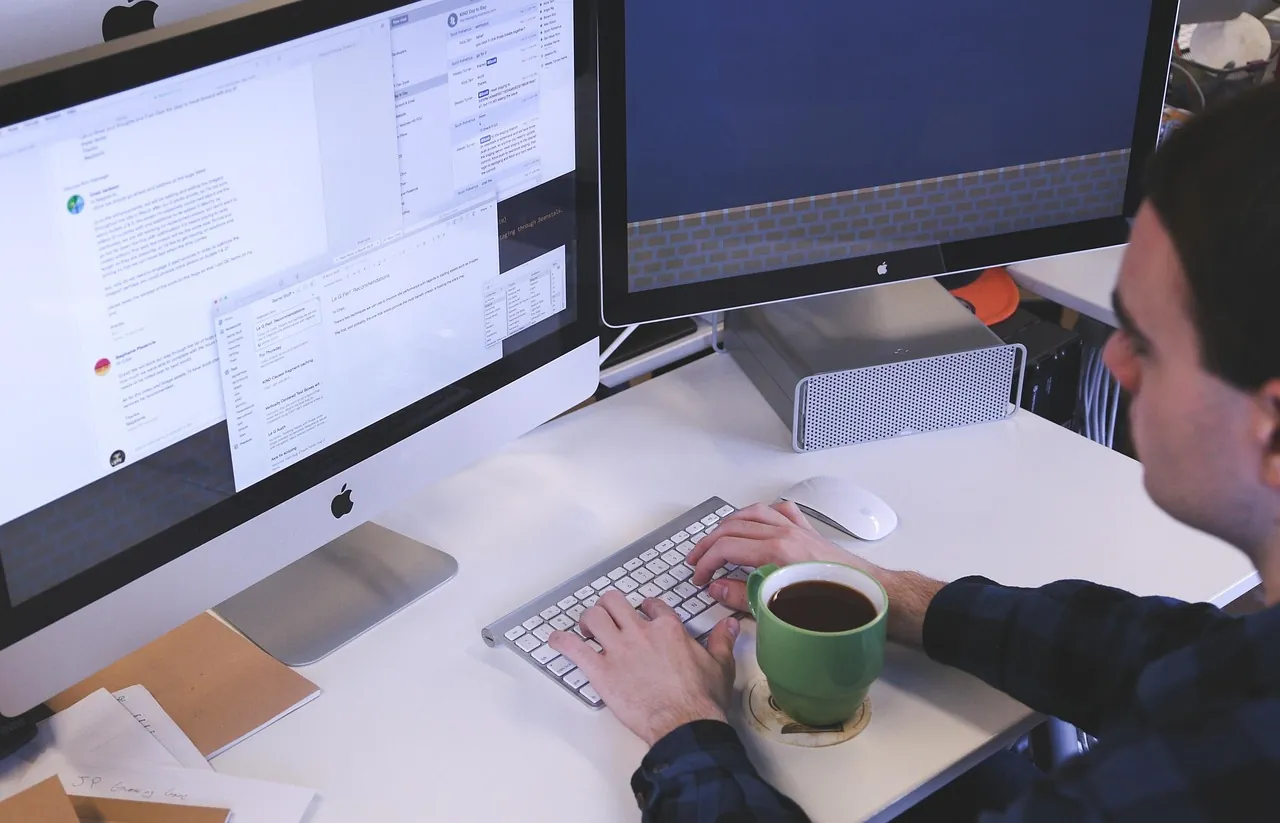
AI computer use works through a repeating loop: a local application captures a screenshot of your screen, sends it to a multimodal AI model, and receives mouse or keyboard commands like clicking coordinates or typing text. Automation software executes those inputs and sends back a fresh screenshot so the model can plan the next step.
Because the model reads graphical interfaces visually instead of calling a custom software API, it can operate almost any program built for a person. That includes web forms, multi-window desktop apps, and older enterprise software that never offered developer integrations.
ContentsToggle
How does the screenshot-and-action loop actually run?
A common assumption is that the AI model plugs directly into your operating system and moves your cursor itself. In reality, the model stays isolated behind an API, while a local host application (often called a harness) handles every physical input on your computer or virtual machine.
According to Anthropic’s computer-use documentation (2026), each task cycles through four distinct steps until the goal is finished or a safety rule pauses execution:
- The host application sends your written request, a screenshot, and a list of available interface actions to the multimodal model.
- The model inspects the image, decides what needs to happen next, and returns one or more structured tool calls (such as taking a screenshot, clicking a coordinate, zooming in, or typing text).
- Local automation software on your machine or container translates those tool calls into real browser or OS inputs using tools like Playwright, xdotool, or pyautogui.
- The host application captures the updated screen state and returns either a new screenshot or a short confirmation like OK so the model can check its work and pick the next move.
To cut down on waiting between round trips, newer setups allow the model to batch several consecutive actions into a single response. In Anthropic’s 2026 reference toolset (computer_toolset_20260801), the model chooses from 17 built-in actions to handle clicks, drags, key presses, and zoomed inspections without constant back-and-forth.
The loop also adapts to where the agent runs. Google DeepMind noted in October 2025 that its Gemini 2.5 Computer Use release was tuned primarily for web browsers and mobile interfaces rather than full desktop operating systems, so its client harness returns the current browser URL alongside every fresh screenshot and recent action history.
How does an AI find the right button on a screen?
Looking at a screenshot and predicting the exact spot to click is called GUI grounding. Researchers behind the 2024 OSWorld benchmark study identified GUI grounding as one of the biggest bottlenecks for early agents, because missing a small icon or text field by a handful of pixels breaks the entire workflow.
Different vendors encode screen coordinates in different ways. Some models output raw pixel positions tied directly to the screenshot resolution, while Google’s Gemini Computer Use API (2026) predicts points on a normalized 0 to 1000 grid so client code can convert any coordinate into real display pixels by scaling against the monitor’s width and height.
Agents do not always rely on raw images alone. In the NeurIPS 2024 OSWorld evaluation, researchers compared four distinct ways of feeding screen data to an AI model:
- Raw screenshots that show the exact pixels a human sees, including canvas graphics and custom app layouts.
- Operating system accessibility trees, which provide structured text descriptions of buttons, menus, and input boxes originally built for screen readers.
- Hybrid inputs that combine screenshots with accessibility trees so the model gets both visual layout and exact element metadata.
- Set-of-Marks overlays, which stamp numbered bounding boxes onto clickable icons before the image reaches the model.
Other frameworks build dedicated vision pipelines to pre-process the screen. Microsoft’s OmniParser (2024), for example, runs a fine-tuned YOLOv8 detector to spot icons, pairs it with BLIP-2 or Florence2 to caption what each icon represents, and adds optical character recognition (OCR) to extract text before handing the labeled screen to a reasoning model.
How AI computer use differs from APIs and browser scripts
AI computer use does not replace application programming interfaces (APIs) or traditional browser automation. Direct APIs exchange structured data between two programs in milliseconds without rendering a single button, so any workflow that already has an official API remains faster and cheaper without a vision loop.
Deterministic browser automation tools such as Playwright and Selenium sit in the middle. They read a webpage’s Document Object Model (DOM) using fixed CSS or XPath selectors, which makes them fast and repeatable on stable websites, yet fragile whenever a site redesigns its HTML and unusable inside non-HTML desktop programs or canvas-rendered apps.
| Approach | How it reads software | Speed and precision | UI change resilience | Best fit |
|---|---|---|---|---|
| Direct APIs | Structured JSON or network endpoints | Fastest and exact | Unaffected by visual redesigns | High-volume data syncs with official integrations |
| DOM scripts and RPA | HTML selectors or recorded macros | Fast and deterministic | Breaks when buttons move or markup changes | Stable web workflows and repetitive back-office forms |
| AI computer use | Screenshots, accessibility trees, and coordinates | Slower due to image loops | Adapts visually to layout shifts and pop-ups | Legacy desktop apps, canvas UIs, and multi-app tasks without APIs |
Rather than forcing a strict choice, modern systems increasingly mix both methods. OpenAI noted in March 2026 that GPT-5.4 can combine Playwright code with visual screenshot clicks, while Anthropic’s 2024 tool setup paired visual computer actions with bash and text-editor tools so the model can run shell commands whenever typing code beats dragging a mouse.
How accurate are computer-use agents on real desktop tasks?
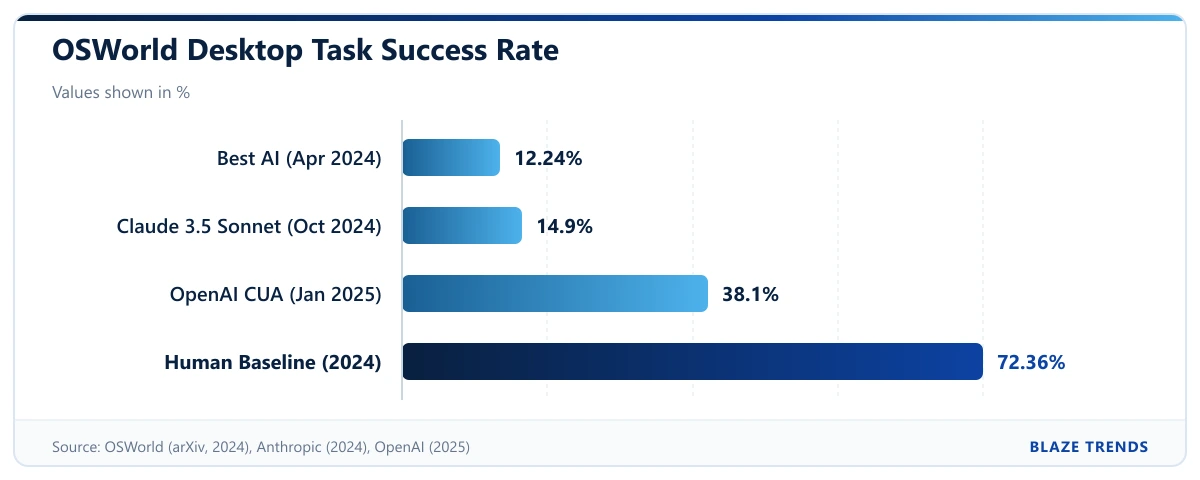
Progress on visual desktop control moved quickly between 2024 and 2026, measured primarily on OSWorld, an academic suite of 369 real-world Ubuntu tasks and 43 Windows tasks. When OSWorld launched in April 2024, human testers completed more than 72.36% of tasks while the top AI model solved just 12.24%.
Later that year, Anthropic’s Claude 3.5 Sonnet reached 14.9% on OSWorld in October 2024. By January 2025, OpenAI’s Computer-Using Agent (CUA) climbed to 38.1%, showing what OpenAI called test-time scaling: performance improved when the agent received a higher step budget to verify and correct its own mistakes.
By 2026, labs shifted to OSWorld-Verified, an updated version of the benchmark with task fixes whose scores are not directly interchangeable with 2024 results. OpenAI reported 75.0% for GPT-5.4 and 72.1% for GPT-5.4 mini in March 2026, while Anthropic reported 78.5% for Claude Sonnet 4.6 under a revised evaluation harness in June 2026.
High benchmark percentages still hide real-world friction. Anthropic cautioned in February 2026 that controlled OSWorld tests do not fully capture messier, higher-stakes everyday computer work, and OpenAI documented persistent stumbles on unfamiliar interfaces and fine-grained text editing.
Efficiency trails accuracy as well. An ICML 2025 workshop study from WukLab (OSWorld-Human) evaluated 16 computer-use agents and found that even the strongest models took 1.4 to 2.7 times more steps than necessary to finish a task.
What are the security risks and guardrails?
Giving a vision model control over a mouse and keyboard introduces a major vulnerability called prompt injection. As the OWASP Gen AI Security Project (2025) explains, language models process system instructions and untrusted external data inside the same context window, so hidden text on a webpage, in a document, or inside an image can hijack tool calls and trick an agent into clicking malicious links or leaking private files.
In OpenAI’s Operator System Card (2025), researchers categorized computer-use risks across three misaligned actors: a user issuing a harmful prompt, a model making an accidental mistake, or an adversarial website trying to steer the agent. Because OWASP emphasizes that prompt warnings alone cannot reliably prevent injection, production systems rely on layered technical defenses outside the model:
- Sandboxed execution inside Docker containers or dedicated virtual machines, as used in Anthropic’s 2026 reference implementation, to keep the agent away from your main operating system files.
- Least-privilege account access and kill switches so a hijacked session cannot touch unrelated apps or run indefinitely.
- Explicit human-in-the-loop confirmation prompts before sensitive actions such as purchases, account logins, or irreversible deletions.
- Watch modes and automated prompt-injection monitors that pause the session if suspicious instructions appear or if you switch away from watching the screen.
Those confirmation checkpoints make a measurable difference. In OpenAI’s 2025 safety evaluations for Operator, pausing for user approval before high-risk actions reduced the risk of harm from model mistakes by roughly 90%.
Frequently asked questions
Does an AI computer-use agent record everything on my screen?
During an active task, the client harness captures screenshots on every loop cycle so the model can see what changed and pick the next click. Running the agent inside a Docker container, a virtual machine, or a single isolated browser window limits what the model sees to that workspace instead of your entire desktop.
Can an AI computer-use agent log into accounts or bypass CAPTCHAs?
Major computer-use platforms are intentionally configured to pause and hand control back to you at logins, CAPTCHAs, payment screens, and other sensitive checkpoints. Stopping at those boundaries lowers the chance of accidental purchases or unauthorized access to saved credentials.
Why is AI computer use slower than normal automation?
Every action in a visual loop requires capturing an image, uploading it to a multimodal model, waiting for coordinate reasoning, executing the click, and verifying the result. Because top agents also take 1.4 to 2.7 times more steps than an optimal path, visual control adds noticeable latency compared to direct API calls or DOM scripts.