
You can play Grand Theft Auto VI in the cloud on Xbox One, Xbox Series X|S, PlayStation 5, and PlayStation Portal after buying a digital copy, skipping the 212 GB PS5 install. Cloud streaming does not work on PCs, phones, or smart TVs. To play on those screens, stream from your own console using Remote Play.
Cloud streaming runs the game on Microsoft or Sony servers, so you do not need local storage or even a current-generation console in your living room. Remote Play streams video directly from a PS5 or Xbox Series X|S you already own, letting you play on a laptop, handheld PC, or smartphone without paying extra subscription fees.
| Method | Supported devices | Cost and limits | Video and graphics ceiling | Local storage needed |
|---|---|---|---|---|
| Xbox Cloud Gaming | Xbox One, Xbox Series X|S | Digital game ($79.99 as of Nov 2026) plus Game Pass hours (5–15/month) or Cloud Playtime pack | Up to 1440p / 30 Mbps on Series X|S (Ultimate); 1080p on Xbox One and lower tiers; Series S graphics | None |
| PlayStation Cloud Streaming | PS5, PlayStation Portal | Digital PS5 game plus PS Plus Premium ($19.99/month in US as of May 2026); no monthly hour cap | Up to 4K (2160p) HDR at 60Hz on PS5; up to 1080p on PS Portal | None |
| Xbox Remote Play | Windows PC, Xbox ROG Ally, mobile browsers | Free with an owned Xbox Series X|S and game copy; zero cloud hours used | Depends on home network (7–10 Mbps client speed recommended) | Full install on Xbox Series X|S |
| PS Remote Play | Windows PC, Mac, mobile, Android TV, PS Portal | Free with an owned PS5 and game copy | Depends on home network (15 Mbps upload and download recommended) | Full install on PS5 (212 GB) |
ContentsToggle
How to play Grand Theft Auto VI in the cloud on Xbox
Grand Theft Auto VI launched on Xbox Cloud Gaming on November 19, 2026, running with Xbox Series S graphics settings on both Xbox One and Xbox Series X|S consoles. You must buy the digital edition ($79.99 on the Xbox Store as of November 2026; check the Microsoft Store for current pricing) before the cloud launch button unlocks on your account.
Starting in November 2026, Xbox Game Pass plans switched to capped monthly cloud hours that reset on the first of each month: 5 hours on Essential, 10 hours on Premium, and 15 hours on Ultimate. According to the Xbox Support playtime guide, you can also buy standalone Cloud Playtime packs (10 hours for $3.99, 25 hours for $7.99, or 50 hours for $11.99 at introductory US launch prices) that stack up to 200 hours without a Game Pass subscription, and monthly Game Pass hours are always consumed first.
Your tier also sets stream quality and queue priority. Game Pass Ultimate gives the shortest wait times and streams at up to 1440p and 30 Mbps on Xbox Series X|S (or 1080p and 18 Mbps on Xbox One), while Premium, Essential, standalone playtime packs without Game Pass, and ad-supported sessions cap at 1080p and 12 Mbps.
Follow the steps from the official Xbox Wire guide to launch the game:
- Buy the digital Xbox edition of Grand Theft Auto VI on the account that holds your Game Pass hours or purchased Cloud Playtime.
- Press the Xbox button on your controller to open the guide and search for Grand Theft Auto VI.
- Select Manage, then select See in Microsoft Store.
- Choose Play With Cloud on the Store page to start streaming.
- Disconnect your cloud session as soon as you finish playing so your playtime clock stops counting down.
Stream GTA VI in the cloud on PS5 and PlayStation Portal
Sony restricts cloud streaming to an adult PlayStation Network account holding both a digital PS5 copy of Grand Theft Auto VI and an active PlayStation Plus Premium membership ($19.99 a month or $54.99 for three months in the US as of May 2026; check the PlayStation Store for current regional pricing). As Engadget’s November 2026 report quoted from the PlayStation Store notice, “PS5 and PS Portal cloud streaming [is] supported only with Premium subscription.”
Unlike Xbox, Sony puts no monthly hour cap on PlayStation Plus Premium cloud sessions, and streaming saves 212 GB of PS5 drive space. You do not need to own a PS5 to play on a PlayStation Portal, and cloud sessions run normally even when a home PS5 is switched completely off.
- Sign into your PS5 or PlayStation Portal with the same adult PlayStation Network account that owns both PlayStation Plus Premium and the digital PS5 copy of Grand Theft Auto VI.
- On PlayStation Portal, open the Cloud Streaming or Search tab on the home screen, select Grand Theft Auto VI, and launch the stream.
- If your handheld connection drops frames, open the Quick Menu while streaming and pick Max Resolution to step down from 1080p to 720p, as outlined in the PlayStation Portal streaming guide.
- On a PS5 console, find Grand Theft Auto VI in your Game Library or on its PlayStation Store page and pick the cloud streaming option instead of downloading the files.
Set up Remote Play for PC, handhelds, and phones
Because Grand Theft Auto VI has no PC port at launch and neither Microsoft nor Sony allows direct PC or mobile cloud streaming for the game, Remote Play is the official way to play on a laptop, desktop, handheld PC, or smartphone. On Xbox, Remote Play streams straight from your console and never deducts from your monthly Game Pass hours or purchased playtime packs.
Stream from an Xbox Series X|S
- Press the Xbox button on your Xbox Series X|S, then open Profile & system, Settings, Devices & connections, and Remote features.
- Check Enable remote features, then change Power options to Sleep so the console can wake up over your network.
- Select Test remote play in the same menu and verify green check marks for upload speed, NAT type, port 3074, and Sleep mode.
- Pair an Xbox Wireless Controller to your PC, Xbox ROG Ally, or phone via Bluetooth or USB.
- Open the Xbox on PC app, click your profile icon in the top right, pick Accessories & remote play, and select Remote play—or open a supported web browser, go to xbox.com/remoteplay, choose your console, and select Remote play on this device.
Microsoft’s official instructions list both the Xbox on PC app and the browser site, though PCMag reported in November 2026 that direct Xbox PC app streaming for Grand Theft Auto VI was disabled during testing. If the PC app refuses to connect, switch to xbox.com/remoteplay in a browser, which is also the standard method on phones.
Stream from a PlayStation 5
- Install Grand Theft Auto VI on your PS5 and update the console to the current system software.
- From the PS5 home screen, open Settings, System, and Remote Play, then turn on Enable Remote Play for your profile.
- Go to Settings, System, Power Saving, and Features Available in Rest Mode, then enable both Stay Connected to the Internet and Enable Turning on PS5 from Network, per the PlayStation Remote Play setup guide.
- On a Windows 10 (64-bit) or Windows 11 PC, connect a DualSense wireless controller with a USB cable and launch the PS Remote Play app, or open the app on Mac, mobile, Android TV, or the Remote Play tab on PlayStation Portal.
- Sign in with your matching PlayStation account, select your PS5, and test the stream on your home network before trying it on the road.
Fix lag, blocked streams, and setup mistakes
Network settings, account mismatches, and console power modes cause far more streaming trouble than raw internet speed. Plugging your Xbox Series X|S or PS5 directly into your router with an Ethernet cable is the most reliable fix for choppy video and audio dropouts on both platforms.
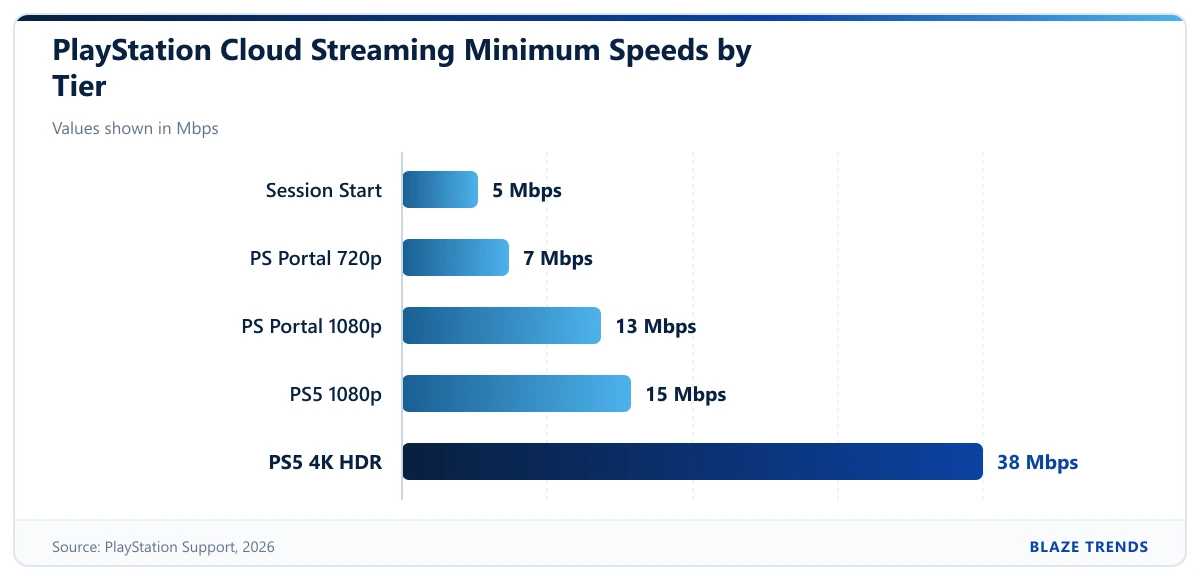
Sony sets 5 Mbps as the minimum broadband speed to start a PlayStation cloud session, climbing to 7 Mbps for 720p and 13 Mbps for 1080p on PlayStation Portal, and 15 Mbps for 1080p or 38 Mbps and above for 4K HDR at 60Hz on PS5. For PS Remote Play, Sony recommends at least 15 Mbps upload and download and advises turning off router band steering (a feature that switches devices between 2.4 GHz and 5 GHz Wi-Fi mid-session) to keep PlayStation Portal stable.
On Xbox Remote Play, Microsoft’s console test checks for at least 4.75 Mbps upload speed (9 Mbps or faster is optimal), an Open or Moderate NAT setting (which controls how your router handles incoming gaming traffic), outbound port 3074 open, and latency under 150 ms. Keep your receiving PC or phone on a 5 GHz Wi-Fi network with 7 to 10 Mbps download speed.
- Buying Grand Theft Auto VI on a secondary profile blocks PlayStation cloud streaming, since the digital license and PlayStation Plus Premium membership must sit on the same adult account.
- Physical disc copies cannot be cloud-streamed on PS5 or PlayStation Portal, though leaving your disc in your home console works over Remote Play.
- Shutting your console down completely breaks remote wake-up; Xbox Sleep mode and PS5 Rest Mode network settings must stay enabled.
- Trying to stream Grand Theft Auto VI through the PlayStation Plus PC app fails because Sony limits PC cloud streaming to PS4 and Classics Catalog games.
- Attempting to broadcast gameplay or launch a PlayStation Plus Premium cloud stream during a PS Remote Play session is blocked by Sony’s system rules.
Frequently asked questions
Can you play Grand Theft Auto VI on Xbox One without upgrading?
Yes. Buying the digital Xbox edition lets you stream Grand Theft Auto VI on an Xbox One through Xbox Cloud Gaming using Xbox Series S graphics settings, capped at 1080p (up to 18 Mbps on Game Pass Ultimate, or 12 Mbps on lower tiers and standalone playtime packs). You still need active Game Pass cloud hours or purchased Cloud Playtime to launch the game.
Does cloud streaming availability vary by country?
Yes. PlayStation cloud streaming only works in regions where Sony sells PlayStation Plus Premium rather than PlayStation Plus Deluxe, and Xbox Cloud Gaming availability, hourly allowances, and playtime pack prices vary by market. Check your regional Xbox Store or PlayStation Store before paying for a membership solely to stream the game.
Can you use a mouse and keyboard with Xbox Remote Play?
No. Microsoft specifies that mouse, keyboard, and touch controls are not supported for Xbox Remote Play, so you need a compatible wireless or USB controller paired to your PC, handheld, or mobile device.