
Passkeys replace passwords with a unique cryptographic key pair created on your device. The website stores only a non-secret public key, while your private key stays behind your biometric scan or device PIN. Phishing sites cannot steal passkeys because your browser binds every key to the real site’s exact domain, blocking sign-in on lookalike addresses.
ContentsToggle
How passkeys replace passwords during sign-in
Passkeys run on FIDO2 open standards, pairing the World Wide Web Consortium’s Web Authentication (WebAuthn) browser API with the Client to Authenticator Protocol (CTAP), according to the FIDO Alliance passkey overview. Traditional passwords and 6-digit authenticator apps rely on a shared secret copied onto both your device and the company’s server, which means a server breach can expose your credentials.
When you set up a passkey, your phone, computer, or hardware security key creates a unique asymmetric key pair exclusively for that account. Only the non-secret public key travels to the website’s database. Your private key never leaves your authenticator or its end-to-end encrypted vault.
- When you select sign in, the website (known in WebAuthn as the Relying Party) sends your browser a fresh, single-use random cryptographic challenge.
- Your browser searches for a stored credential matching the site’s Relying Party ID (rpId) and prompts you for local verification through Face ID, Touch ID, Windows Hello, or your device PIN.
- Once you confirm, your authenticator signs the challenge and browser metadata using your private key and sends that mathematical signature back.
- The website verifies the signature against your stored public key and opens your session without ever seeing the private key.
Because each cryptographic challenge expires after one use, an attacker who intercepts network traffic cannot replay that signature later. The official FIDO Alliance technical walkthrough below breaks down how these public-key exchanges work under the hood.
Cutting out typed strings also speeds up everyday logins and reduces failed attempts. In a 2024 independent survey commissioned by the FIDO Alliance, 53% of respondents had enabled passkeys on at least one account, and 22% enabled them wherever supported, with passkeys delivering 20% more successful sign-ins than passwords.
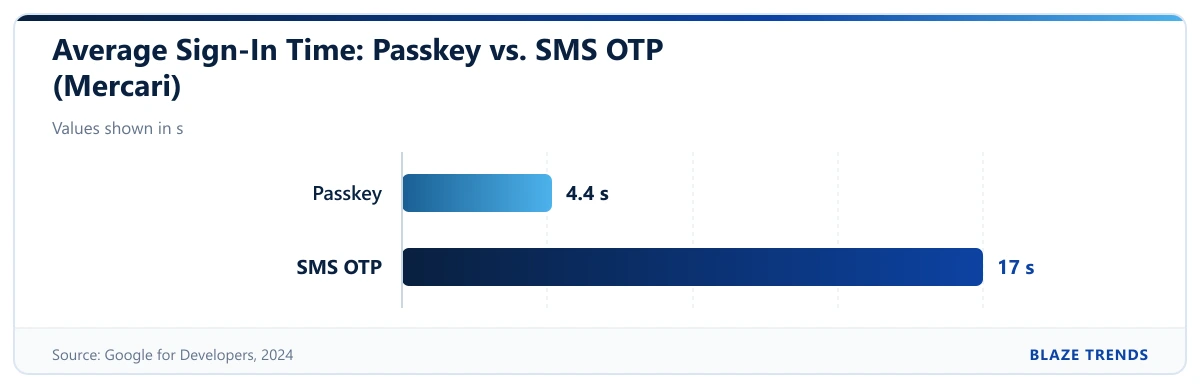
Google reported in 2024 that passkeys are 50% faster than passwords on Google Accounts, following a March-to-April 2023 Google dataset where passkey logins averaged 14.9 seconds. In the Mercari passkey case study published by Google for Developers in October 2024, Mercari’s 2023 passkey rollout lifted sign-in success rates to 82.5% versus 67.7% for SMS one-time codes and dropped average authentication time from 17 seconds to 4.4 seconds, making sign-ins 3.9 times faster.
Why phishing sites fail against cryptographic origin binding
Many people assume a 6-digit authenticator app code or text message stops phishing, yet modern adversary-in-the-middle (AiTM) phishing kits defeat both. As the CISA phishing-resistant MFA guide from October 2022 notes, SMS codes, voice prompts, app-based one-time passwords, and basic push notifications remain vulnerable because a reverse-proxy site can sit between you and the real service, relaying your password and 6-digit code within its 30-second window to steal your session cookie.
Passkeys eliminate that weak link by taking domain verification out of human hands. Under the W3C WebAuthn Level 3 specification updated in August 2026, your browser independently writes the active website’s exact origin into a data structure called clientDataJSON and passes the domain’s rpId to your authenticator.
Suppose a phishing email sends you to bank-examp1e.com instead of bank.example.com. Even if the fake page looks identical and you try to sign in, your authenticator checks its vault for a passkey registered to bank-examp1e.com, finds no match, and offers nothing.
Forwarding a live challenge from the real server does not help the attacker either. Your browser still embeds the proxy’s spoofed address inside clientDataJSON, and the real server validates both that origin field and the rpIdHash in the authenticator data before rejecting the mismatched signature.
Cross-device logins add another physical safeguard. When you sign in on a computer by scanning a QR code with your phone, Bluetooth checks that both devices sit physically near each other so a remote attacker cannot trick you into approving a relayed QR code from another location.
Keep one practical limit in mind: cryptographic origin binding protects the sign-in exchange itself. It cannot stop malware already running on your device or prevent attackers from abusing session cookies stolen after you have logged in.
Synced passkeys vs. device-bound security keys
Not every passkey stores its private key the same way. Synced passkeys back up end-to-end encrypted copies across your devices through providers such as Apple iCloud Keychain, Google Password Manager, Microsoft Password Manager, 1Password, Bitwarden, or Dashlane.
Device-bound passkeys remain inside a single computer, phone, or physical FIDO2 USB or NFC security key and can never be exported. Hardware keys add convenience friction when you switch devices, though they narrow the attack surface for high-security accounts.
In the United States, the July 2025 edition of NIST SP 800-63B-4 sets technical authentication rules for federal agencies (and provides voluntary guidance for private organizations). NIST classifies passwords as not phishing-resistant, requires Authentication Assurance Level 2 (AAL2) services to offer a phishing-resistant option that synced passkeys satisfy, and restricts AAL3 to non-exportable private keys on device-bound authenticators.
Federal deployments show how device-bound FIDO keys solve real operational problems. According to a November 2024 CISA case study, the U.S. Department of Agriculture rolled out passwordless FIDO keys to roughly 40,000 registered users, covering seasonal employees ineligible for standard PIV cards and laboratory workers whose decontamination procedures destroy conventional smart cards.
| Login method | Where the secret lives | Blocks AiTM phishing? | Portability and NIST SP 800-63B-4 status |
|---|---|---|---|
| Password only | Shared between you and the server | No | Typed anywhere; not phishing-resistant |
| Password + SMS or TOTP app | Shared secrets on both sides | No (relayable in real time) | Manual code entry; not phishing-resistant |
| Synced passkey | End-to-end encrypted cloud vault | Yes (origin-bound) | Syncs across trusted devices; meets AAL2 |
| Device-bound FIDO2 key | Non-exportable hardware chip | Yes (origin-bound) | Stays on one device or key; meets AAL3 |
How passkey settings, recovery, and transfers vary by platform
Each operating system handles syncing, PINs, and account recovery differently, so knowing where your passkeys live prevents lockouts when you replace a device.
- Apple (iOS and macOS) syncs passkeys through end-to-end encrypted iCloud Keychain and verifies every sign-in locally with Face ID, Touch ID, or your device passcode. Adding a new device requires approving it from an existing trusted device or completing iCloud Keychain escrow recovery, which permanently destroys the escrow record after 10 failed attempts.
- Google (Android and Chrome) relies on your device’s screen lock (PIN, pattern, or password) for passkeys on Android, while creating your first passkey in Chrome on a computer, iPhone, or iPad sets a separate Google Password Manager PIN that cannot be changed on Android. On desktop Chrome, open chrome://password-manager/settings (or select More, Passwords and autofill, Google Password Manager, and Settings) and click Change Google Password Manager PIN; if you forget the PIN without a previously used non-Android device, Google’s passkey reset deletes stored Google Password Manager passkeys so you can create fresh ones.
- Microsoft requires Windows 11 for its current Windows passkey features, letting you store passkeys locally in Windows Hello, sync them in Microsoft Password Manager, save them to third-party managers like 1Password, or authenticate from a nearby phone via QR code and Bluetooth. To control automatic upgrades in Microsoft Edge, open Settings, select Passwords and autofill, choose Microsoft Password Manager, open More settings, and toggle Automatically upgrade to passkeys.
Moving passkeys between competing password managers is gradually getting easier as of 2026. The FIDO Alliance published its Credential Exchange Format (CXF) 1.0 as a Proposed Standard in August 2025 (with errata updated in March 2026) to define portable passkey export files, while the companion Credential Exchange Protocol (CXP) 1.0 remains a Working Draft. Passkeys that use a non-zero signature counter are excluded from CXF and CXP transfers, so check your provider’s current export support before switching vaults.
Frequently asked questions
Does a website receive my fingerprint or face scan?
No. Your device verifies your fingerprint, face scan, or PIN strictly on local hardware to authorize the private key, and the website receives only a mathematical signature proving you hold that key.
What happens if my phone or laptop is lost or stolen?
Your passkeys remain encrypted behind your biometric check or device passcode, so a thief cannot sign in to your accounts. If you use synced passkeys, you can restore them on a replacement device through your provider’s encrypted recovery process, or sign in using the website’s fallback recovery option to register a new passkey.
Can I use a passkey saved on my phone to sign in on someone else’s computer?
Yes. Choose the cross-device sign-in option on the computer to display a QR code, scan it with your phone, and confirm the prompt locally while Bluetooth verifies both devices are physically next to each other.
Are passkeys considered multi-factor authentication?
Yes. Signing in proves two factors in a single gesture: possession of the device or security key storing the private key, plus local verification via your face, fingerprint, or PIN.