
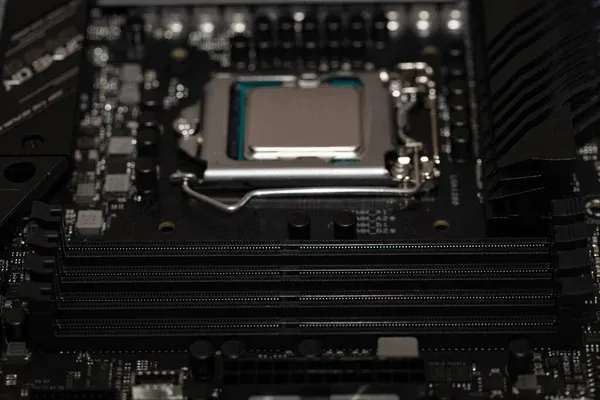
Building a smart home hub often hits a wall the moment your lights take two seconds to turn on after you press a button. That frustrating delay usually traces back to a single hardware constraint: an underpowered processor trying to handle too many central tasks at once. In recent hardware testing conducted by SmartyVan on YouTube, alongside hands-on architectural analysis published by XDA-Developers, performance bottlenecks in home automation setups frequently point straight to the CPU. Getting your hardware right means balancing raw architecture, power draw, and your long-term expansion plans.
You don’t need enterprise-grade server racks to run a fast smart home. But you do need a processor that matches your specific software footprint.
ARM vs. x86: The Architecture Divide
The first major fork in the road is deciding between ARM and x86 architectures. This choice dictates entirely what kind of hardware you will buy.
Systems powered by Intel and AMD processors rely on x86-64 architecture. They provide exceptionally high single-core performance. This is vital for real-time automation execution where speed is everything. They also offer broad compatibility with containerized add-ons and operating systems like Home Assistant OS. If you plan to run a variety of third-party plugins, x86 chips avoid the weird software compatibility quirks that sometimes plague ARM platforms.
ARM processors sit inside budget-friendly single-board computers like the Raspberry Pi and the official Home Assistant Green. These chips are purpose-built for low power consumption. They excel at embedded, single-purpose workloads. While incredibly cost-effective, they struggle with sustained performance under continuous load. If you ask an ARM chip to run dozens of heavy integrations simultaneously, it will eventually choke.
Three Specifications That Actually Matter
When you start reading processor spec sheets, the numbers get confusing fast. For home automation, you only need to care about three primary metrics.
- Cores and Threads: As you add device integrations for Zigbee, Z-Wave, or MQTT protocols, multi-core CPUs scale much better than single-core setups. A multi-core processor can execute multiple instructions concurrently. This prevents your server from locking up when multiple sensors fire at the exact same time, a concept detailed heavily in multi-instruction execution breakdowns.
- Clock Speed: Measured in GHz, clock speed dictates how fast the CPU handles execution cycles. Higher clock speeds translate directly to faster response times for your automations. That means less delay between a motion sensor detecting you and the hallway lights turning on.
- Hardware Acceleration: If your smart home handles any media, built-in graphical acceleration is non-negotiable. Processors featuring technologies like Intel Quick Sync can handle video transcoding or AI-based camera object detection with minimal strain, according to Intel’s documentation on server processors.
Matching Processing Power to Your Setup
Your software environment dictates your hardware needs. Running a dedicated hub is vastly different from running a fully virtualized server closet.
Bare-Metal Deployments
If your server is dedicated entirely to running Home Assistant OS without other background tasks, ultra-low-power CPUs shine. Processors like the Celeron N4000 or the RK3568 ARM chip are highly stable. They run silently without fans and consume almost zero electricity. For a standard smart home setup without security cameras, these processors are perfectly adequate.
On the single-board front, the Raspberry Pi 5 processor delivers a massive performance boost over previous generations. Meanwhile, the Odroid-N2+ remains a flagship ARM board for handling demanding bare-metal setups natively, meeting all modern hardware requirements for dedicated hubs.
Virtualization and Homelabs
Many enthusiasts prefer running a Type-1 hypervisor like Proxmox. This allows you to host your home automation OS right alongside NAS servers, media containers, and network ad-blockers. This approach requires significantly more computational power and memory.
If you take this route, desktop-class processors like the Intel Core i5/i7 or AMD Ryzen 5 become the baseline. And if you want to run powerful AI models locally on budget hardware, having that extra multi-threaded virtualization headroom is a lifesaver. The Intel i3-12100 or i5-13500 processors provide exactly this kind of muscle.
The Efficiency Sweet Spot
Right now, the Intel N100 and N97 processors are dominating the budget server space. Drawing just around 6W of power, they strike a perfect balance. They offer excellent power efficiency, include built-in Quick Sync for handling media feeds, and pack enough horsepower for small to mid-sized smart homes, according to hardware analysis by LincPlus. You get the stability of x86 without the high electricity bill of a full desktop rig.
The Edge Processing Alternative
Before you buy a more expensive CPU, consider changing how your network operates. You can actually reduce your central server’s workload through decentralization.
Pushing automation logic directly into edge hardware allows sensors to process their own localized inputs in microseconds. For example, flashing an ESP32 microdevice to handle local logic stops your main server from wasting cycles on basic micro-interactions.
Similarly, utilizing Zigbee direct peer-to-peer radio binding allows your smart switches to talk directly to your smart bulbs. The command never even hits your server. This unburdens the central home automation CPU, allowing it to act as a supervisor focused on heavy video analytics rather than immediate state execution. It is a highly effective way to offload computational strain from older processors.
Common Issues and Fixes
Symptom: Your server crashes when you check camera feeds.
Fix: This happens when video processing maxes out standard CPU cores. Switch to a processor with built-in hardware acceleration (like an Intel chip with an iGPU) or add a dedicated AI accelerator like a Google Coral TPU to handle the video analytics.
Symptom: Automations trigger seconds after you press a button.
Fix: Your single-core processor is queuing instructions. You either need to upgrade to a multi-core processor (like an N100) or utilize Zigbee direct binding to bypass the server entirely for simple lighting tasks.
The Verdict
If you are building a dedicated smart home controller that only handles sensors, lights, and basic logic, stick with an ARM-based board like the Raspberry Pi 5. It keeps costs low and draws almost no power.
But if you plan to integrate live security camera feeds, run localized voice control, or host other server applications on the same machine, buy an Intel N100 mini-PC. The x86 architecture guarantees software compatibility, and the built-in hardware acceleration will process camera feeds without breaking a sweat. It is currently the smartest hardware investment for a growing home network.