
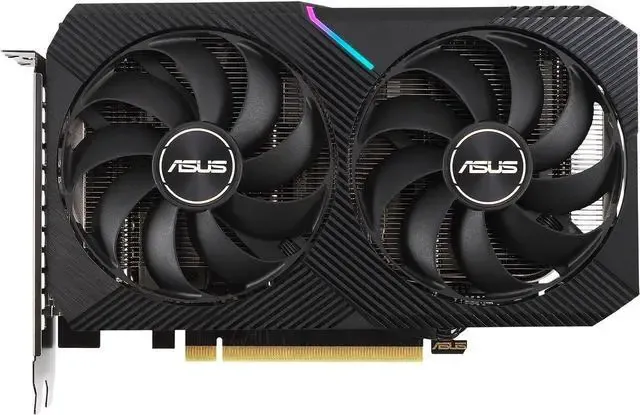
You don’t need a multi-thousand-dollar enterprise server to run capable language models anymore. If you want to run artificial intelligence directly on your personal machine without paying for cloud subscriptions, the sweet spot for a mid-sized 7-billion to 14-billion parameter AI sits squarely on standard consumer hardware. Specifically, you need an NVIDIA RTX 3060 graphics card with 12GB of Video RAM alongside a baseline 16GB requirement of system memory.
Getting these systems up and running is entirely achievable today. You just need to understand how the memory math works.
The Math Behind Local Inference
Massive neural networks naturally require an enormous amount of memory to hold their mathematical weights. To fit these corporate-scale AI models onto budget computer parts, developers rely on compression tricks. The most important technique is quantization.
Developer Paul Hoke outlines on Medium how reducing a model’s weights from large 16-bit floating-point numbers down to 4-bit precision slashes the required memory footprint by roughly 75%. Specifically, the Q4_K_M quantization standard accomplishes this with barely perceptible drops in reasoning quality. That single math trick is what makes local execution on cheap hardware possible.
Then you have the file format itself. Developer Atal Upadhyay explains that the universal modern standard is GGUF. These files replace older formats by packing the entire brain of the AI—the weights, the tokenizer, and all the metadata—into one single memory-mappable package. You download one file, load it, and you are ready to compute.
Recommended Budget Hardware Builds
When picking parts for an inference rig, prioritize memory capacity over pure processing speed. Independent developer Muguchia Erick Mwangi shared his home lab build logs on DEV Community to prove this point. He successfully constructed a cheap, refurbished inference server using an older Ryzen 5 3600 processor, 32GB of DDR4 memory, and an RTX 3060 12GB.
The 12GB capacity of that specific graphics card is critical. Mwangi notes that the cheaper 8GB variant of the exact same card frequently hits hard memory limits and crashes when handling long conversation context buffers. The VRAM holds the model while it actively thinks. Your standard system RAM simply holds the operating system and background tasks.
Apple computers actually have a unique advantage here. Apple Silicon Mac machines pool their system RAM and VRAM together into a unified memory architecture. This means a Mac with 64GB or 128GB of memory can load massive 70-billion parameter models entirely into RAM without offloading anything. This is a feat that typically requires stringing multiple expensive graphics cards together on a standard Windows PC setup.
Of course, Windows and Linux hardware is catching up rapidly. You might soon find yourself comfortably running these models on a laptop without a dedicated GPU entirely, given how fast unified memory architectures are advancing across the board.
CPU-Only Setups for Ultra-Budget Builders
What if you don’t even own a graphics card? You can absolutely still run smaller AI systems purely on your processor.
In hardware benchmark testing by It’s FOSS, reviewers ran sub-2-billion parameter models entirely on a standard Linux CPU setup without any GPU acceleration. The results were highly usable. The tiny 0.6B parameter Qwen model spat out a responsive 34 to 36 tokens per second. Moving up to the 1.1-billion parameter TinyLlama model yielded 25 to 28 tokens per second. Even the highly capable 1-billion parameter Gemma 3 generated 18.6 tokens per second.
Those speeds are slightly slower than reading pace, but they work perfectly for narrow background tasks like sorting files, summarizing text documents, or generating code snippets.
The Best Software for Your Local Lab
You no longer need to build complex Python environments to start chatting with an open-weights model. Today’s software ecosystem abstracts away the messy code. Everything runs on top of a foundational C/C++ inference engine called llama.cpp. Developer Tahir Balarabe notes that this engine efficiently optimizes hardware offloading, sharing the computational load across your CPU and GPU automatically.
From there, you choose an interface. The two most popular tools handle execution very differently:
- LM Studio: Think of this as a visual desktop application. It wraps the core engine in a graphical interface where you can search the Hugging Face repository, check if a model’s quantization fits your specific hardware, and adjust GPU offload layers with simple sliders.
- Ollama: This is a developer-friendly, command-line tool. It runs silently in the background as a local server.
You can see these distinct operational differences in how they handle memory. Ollama only drops the model into your RAM when you ping it via an API on localhost:11434, making it ideal for automated coding scripts.
The Privacy and Cost Benefits
Running models on your own desk fundamentally changes how you interact with artificial intelligence. Independent researcher Vikas Chandra points out that processing documents locally guarantees absolute data privacy. Your private health records, legal contracts, or proprietary source code never leave your machine. This fulfills strict offline compliance regulations that cloud APIs inherently violate the second you hit send.
Then there is the financial angle. Cloud-based AI companies charge you for every single token generated. Much like internet users abandoning costly SaaS platforms for self-hosted apps, moving your AI to local hardware means unlimited, free usage. You pay for the graphics card once.
The economic math simply makes sense. According to market data from Techsy, roughly 55% of enterprise AI adoption happens entirely on-premises today. Local models also bypass network latency entirely. Cloud APIs suffer from network round-trip delays that often take 200 to 500 milliseconds before the first word even appears. Local execution returns tokens in tens of milliseconds.