
Switching music streaming services often feels like breaking up with a long-term partner. You want to move on, but your carefully crafted playlists can hold you back. Nobody wants to rebuild years of music history by adding songs one by one. Luckily, you don’t have to anymore. There’s a straightforward way to bring all your favorite tunes with you.
Before you dive in, make sure you’ve signed up for Apple Music. You can pick a standard monthly plan. If you already use other Apple services, you might consider an Apple One package, which bundles several services together.
How to Move Your Music (iOS/iPadOS)
If you’re an iPhone or iPad user, transferring your playlists is very simple. You can do it right from your device’s settings menu.
- Go to the **Settings** app on your device.
- Scroll down and tap on **Apps**, then find and select **Music**.
- Look for a menu option called “Transfer Music from Other Music Services” and tap it.
- The app will show a list of streaming services. Pick **Spotify** from this list.
- You’ll need to log into your Spotify account. This step lets the transfer service, called SongShift, access your music information.
- Next, choose which playlists, albums, or specific songs you want to move over.
- Finally, tap “Add to Library.” Wait a moment, and your music will be transferred to Apple Music. It’s really that easy.
Making the Switch on Android
Android users, don’t feel left out. The process is just as easy, though you start in a slightly different place within the app.
- Open the Apple Music app on your Android device.
- Tap the three dots icon located at the top-right corner of the Home screen.
- Go into **Settings**.
- Select “Transfer Music from Other Music Services.”
- From here, you will follow the exact same steps as the iOS/iPadOS method, starting from step 4.
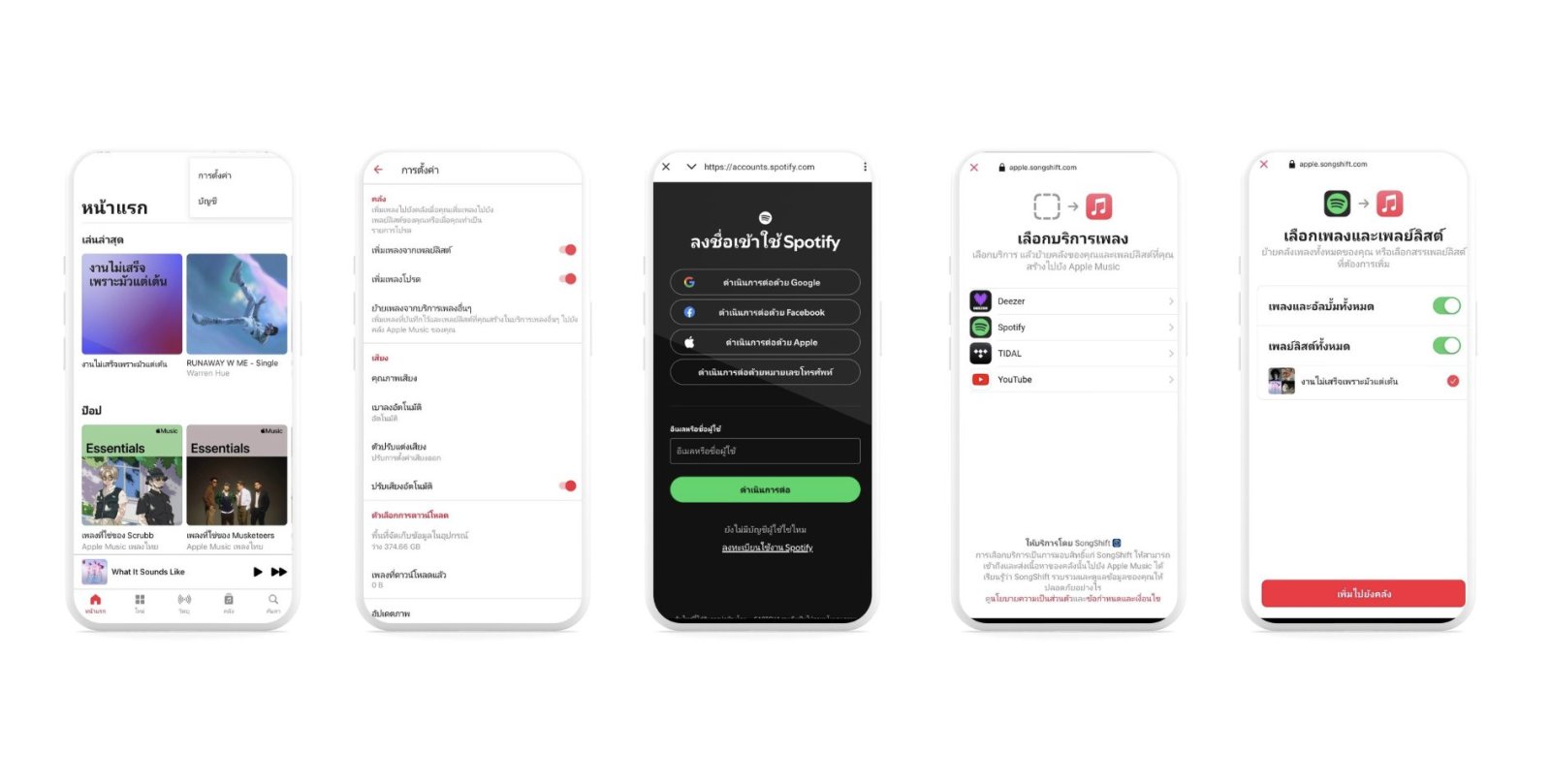
Spotify isn’t the only platform you can migrate from using this method. You can also bring your music over from other services like YouTube, Deezer, and TIDAL. This flexibility makes changing services much less of a headache.
A quick heads-up: while most of your music will make the jump, some very rare tracks or live versions might not come along. This is especially true for songs unique to platforms like YouTube. If Apple Music can’t find an exact match for a song, it will suggest the closest possible version. You’ll get a notification about these suggested songs. Then, you have 30 days to decide if you want to keep them in your library or not.