
Google Photos is, par excellence, the favorite application of many users to organize photos and videos on the smartphone. Whether you have Android or iOS, this app just got a major customization feature.
As XDA-Developers revealed first-hand, it is finally possible to edit the date and time of photos and videos in Google Photos on your smartphone. It was a novelty that until now was only available in the web version of Google Photos.
As you can see from the images, if you click on a photo or video and the date in question is wrong, you can now change it. And the functionality is available on Android or iOS smartphones that we have already tested.
Change the date and time of a photo or video in Google Photos
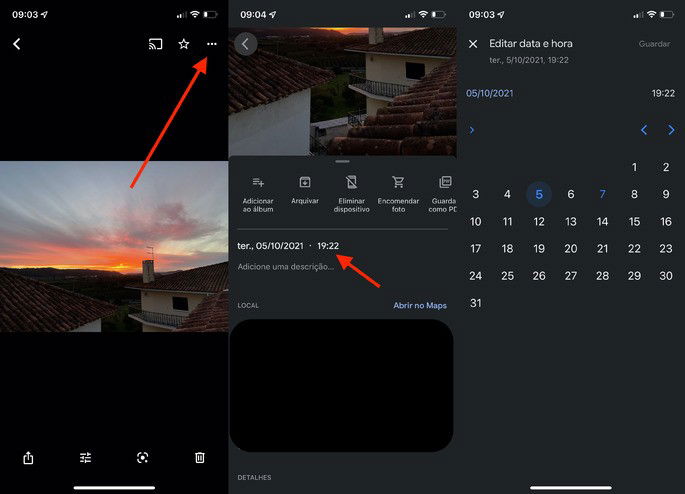
Once you click on a photo or video, just enter the icon with three dots in the upper right corner. There you will find various data about the content, and now the date and time edit is clickable.
Typically, this functionality is already available on all computers. If you tried it on your smartphone and it didn’t work, our advice is to update to the latest version of Google Photos on your Android or iOS. To do this, go to the Google Play Store on Android or the App Store on your iPhone and check if you have the latest version of Google Photos installed on your device.