
Ever stared at your monthly phone bill and felt a jolt of surprise? Many of us expect our communication and TV costs to stay steady. Yet, a common tech trap can make those numbers shoot up, often after installing new apps on your smartphone. If you’re a MEO customer and want to know if you’re paying for hidden digital services, there’s a quick way to find out.
Taking Control of Your Digital Subscriptions
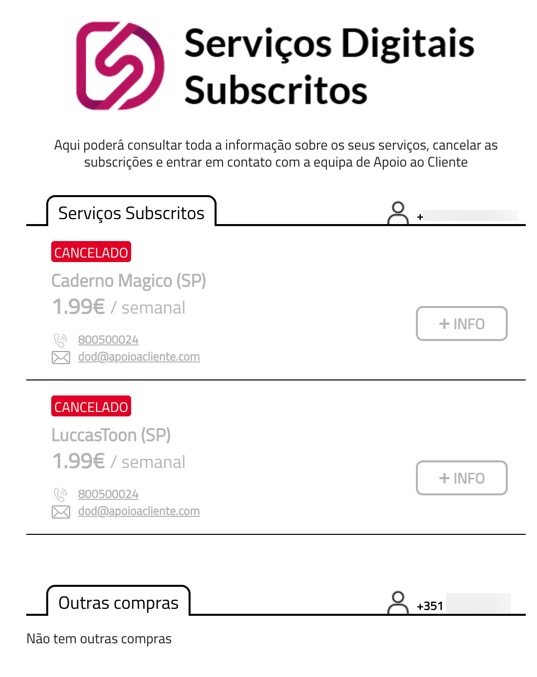
MEO customers often discover extra charges for digital services they didn’t mean to sign up for. These sneaky subscriptions can add up fast. The good news is that there’s an official hub designed to help you manage these. It’s called the MEO Digital Services Portal, found at servicosdigitais.dvpass.com. This portal is connected to DVPass / Digital Virgo, the company that helps manage these charges.
This website is a powerful tool for MEO customers. It allows you to:
- See all active digital services linked to your phone number.
- Cancel unwanted subscriptions right away. You don’t need to call MEO first.
- Reach out to DVPass customer support. They handle these subscriptions for content providers.
These services are often activated without a second thought. Sometimes, it’s just a quick click on an ad banner, within an app, or on a website. Instead of charging your credit card, these costs simply appear on your mobile or landline bill through your phone company.
Getting into the website is simple. Just type in your phone number. You’ll receive a special PIN to log in. Once inside, you can cancel anything you don’t recognize or no longer want.
Important Things to Know
Keep these details in mind to avoid future bill shock:
- Accidental Sign-Ups
- Many MEO customers report having subscriptions without giving clear permission. Sometimes, clicking an ad or an “OK” button on a website is enough to activate a service.
- Small, Regular Fees
- These charges might seem small, usually €1.99, €2.99, or €4.99. But they often recur weekly or monthly, adding up quickly.
- Block Future Payments
- After canceling through DVPass, you can take another step. Ask MEO directly to block third-party payments or digital services. You can do this by calling 16200 or through the My MEO app. This ensures these services won’t get activated again.