
Get ready, tech enthusiasts. This coming Monday isn’t just another start to the work week. It’s the day Apple’s iOS 26 finally drops, a moment many have been waiting for all summer. Apple itself has highlighted how this update elevates the iPhone experience. After months of testing, the highly anticipated update is ready for everyone.
This isn’t just any update; the beta versions of iOS 26 broke records, becoming the most downloaded in iPhone history. People are buzzing, and for good reason. Before the official release, it’s smart to get your device ready. A little preparation can save you a lot of headache on update day.
Millions of users around the world will be trying to download the new software at the same time. This means Apple’s servers will be swamped. Don’t be surprised if the download takes longer than usual. It’s a common event every year, so patience is your best friend.
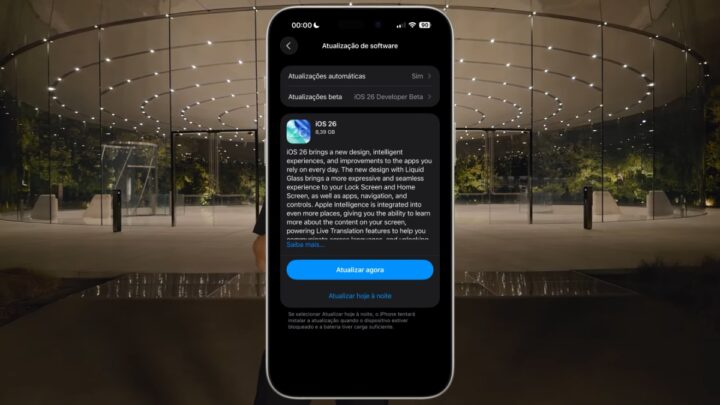
Getting Your iPhone Ready for iOS 26
To ensure a smooth journey into the new operating system, here are some key steps to take before Monday hits:
- Back It Up: Think of it as your digital safety net. While issues are rare, a full backup to iCloud or your computer protects all your precious photos, chats, and files.
- Make Room: iOS 26 can be a big one, sometimes needing up to 20 GB of space on certain models. Now’s the time to clear out old apps, forgotten files, and blurry photos. If you’re really tight on space, you can always update by plugging your iPhone into a Mac (using Finder) or a PC (using the Apple Devices app).
- Power Up and Connect: Make sure your iPhone has at least 50% battery charge. Even better, keep it plugged in during the update. Also, rely on a strong, steady Wi-Fi network. A quick trick is to restart your home router right before you begin the update process.
- Update to the Latest iOS 18 First: This might sound odd, but ensuring you’re on the very last version of iOS 18 can actually shrink the size of the final iOS 26 download. Many security fixes and small changes get applied beforehand.
Which iPhones Get iOS 26?
Good news for many iPhone users! Apple is keeping a wide range of devices compatible with this new update. Here’s the list of models that will be able to install iOS 26:
- iPhone 11 and 11 Pro
- iPhone SE (2nd generation or newer)
- iPhone 12 and 12 Pro
- iPhone 13 and 13 Pro
- iPhone 14 and 14 Pro
- iPhone 15 and 15 Pro
- iPhone 16 and 16 Pro
- iPhone 16e
- iPhone 17 and 17 Pro
- iPhone Air
When Can You Grab the Update?
The big day is Monday, September 15. The exact release time often changes based on your location. However, Apple typically follows a similar pattern each year. For example, in some regions, it might appear around 6:00 PM local time.
If you don’t see the update appear right away, don’t fret. Just head to Settings > General > Software Update. Then, pull down on the screen to refresh and check again.
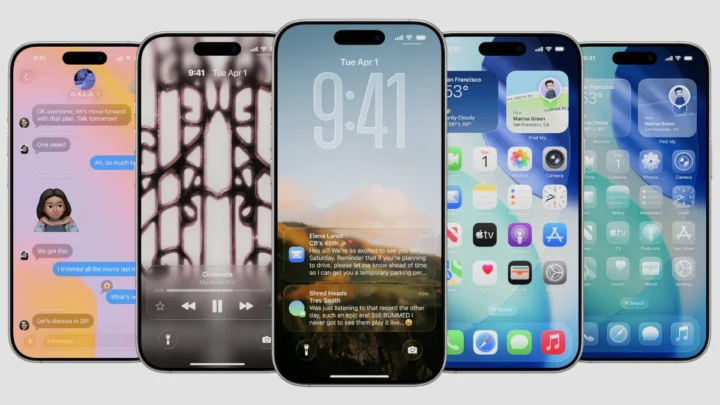
What’s New in iOS 26?
Once you’ve successfully installed iOS 26, get ready to dive into a host of fresh features that change how you interact with your iPhone:
- Liquid Glass Everywhere: Your icons will get a facelift with curvier shapes and dynamic reflections. A new transparent mode will also give apps a unified, modern look.
- More Lock Screen Control: Personalize your lock screen even further. You can now adjust the clock’s size, pick new backgrounds with cool 3D effects, and shift widgets to the bottom of the screen.
- Siri as Your Call Filter: For those mystery numbers, Siri can now step in. It will answer the call, ask who’s calling, and even show you a live transcription of the conversation.
- Photos App Gets Simpler: The photo library is returning to a clean, chronological scroll. Your special collections and memories will find a new home in a separate tab.
- Intuitive Camera Interface: The camera app now focuses on two main modes: Photo and Video. Everything else you might need is just a quick swipe away, making it much easier to use.
- Expanded Apple Intelligence: This powerful feature is exclusive to iPhone 15 Pro models and newer. It allows real-time conversation translation and can even identify objects directly from your screenshots.
- Messages with Polls and Animated Backgrounds: Group chats and conversations just got more fun. You can now create polls and add lively animated backgrounds to your messages.
And that’s not all! There are other cool additions like AutoMix in Apple Music, a redesigned search bar in Safari, and a brand-new Preview app for PDFs. The bottom line is clear: clean up your iPhone, back up your data, and make sure you’re ready for iOS 26 day. It’s going to be a good one.