It’s happened to all of us. You get an email about an important meeting or an event. You read it, tell yourself you’ll add it to your calendar later, and then, life happens. That important detail slips your mind until it’s almost too late. Google seems to be tackling this common problem head-on, giving Gmail users on Android a smart new helper.
For years, people using Google’s suite of tools rarely needed anything else. Now, Google is making that even more true. They are bringing a fantastic feature to the Android version of Gmail. This new tool uses Gemini, Google’s advanced AI, to turn any email into a calendar event.
Gemini has already been making waves, letting you talk to some Google apps. It’s pushing user experiences to levels we couldn’t even imagine a few years ago. Now, a feature that many of us enjoyed on the web version of Gmail, the “Add to Calendar” button, is coming to your phone.
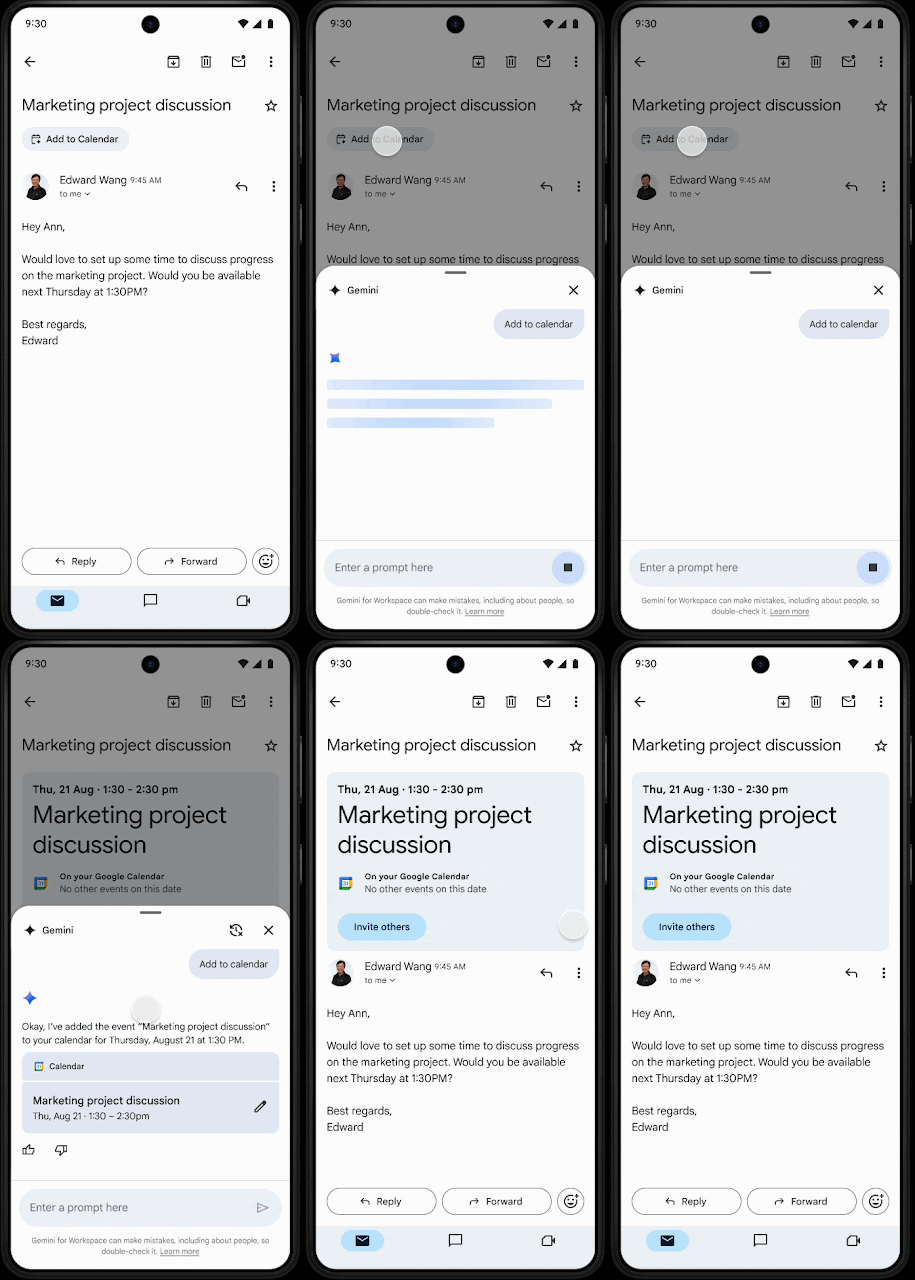
Google explained this new feature in their latest update, shared through WorkSpace Update. Here’s how it works: Gemini reads your emails right on your phone. It looks for anything that seems like an event. When it finds something, it puts an “Add to Calendar” button directly inside that message. Tapping this button brings up a small panel in Gmail. This panel confirms that the event has been saved to your Google Calendar.
This feature does more than just create an event. It also fills in many of the details for you. This means you don’t have to switch between apps. You also don’t have to manually type in event information. Another great benefit is its ability to pull several events from a single email. If you send and receive many emails each day, this feature will save you a lot of time.
This new function joins many other ways Gemini already works with Google Calendar. You can already ask Gemini to create, edit, or even delete events. It’s a clear example of how generative AI can help in daily apps. Specifically, it automates certain tasks. AI takes over checking information and offers you buttons or functions to save time.
This new Gmail feature for mobile devices does have a few limits. For starters, it only works in English right now. Also, the button won’t show up for emails that Gmail already handles. These include things like restaurant reservations or flight confirmations.
The feature extracts event details from your email. But if you want to invite other people, you still have to do that by hand. You use a separate button located with the event details. This part isn’t automated yet. Finally, this feature is only available to certain users for now. You need a Workspace subscription or a Google AI Pro or Ultra plan to use it.