
Windows 11 is already significantly different from the version that launched two years ago, but it looks like there are more changes to come. Microsoft will soon deliver the biggest Windows 11 update of 2023, and pretty much all of the new features have already been or are being tested through the Windows Insider Program. This means we have a very good idea of what to expect from Update 23H2, which is coming very soon. Here you will find everything you need to know.
When will update 23H2 for Windows 11 be released?
With the launch of Windows 11, Microsoft announced that it will introduce annual feature updates instead of Windows 10’s semi-annual approach. Despite some rumors about a new strategy, this was confirmed in a February 2023 blog post.
However, that hasn’t stopped the company from releasing new features in “Moment” updates every few months. This means you don’t have to wait a whole year for new features to become available. The “Moment 3” update was last released in May and brought new features. More followed in June 2023, which we presented to you here.
What about a concrete 23H2 release date? Microsoft confirmed “Q4 2023” in a July 2023 blog post.
Windows Central’s Zac Bowden believes an official announcement for the update will come at Microsoft’s confirmed event on September 21, before the update becomes generally available in October.
You can test many 23H2 features in advance through the Windows Insider Program, but there’s no need to sign up for the recently launched Canary Channel, which is highly experimental and could include potential Windows 12 features.
Will all Windows 11 devices be compatible with version 23H2?
Yes, provided they are using version 22H2. In a July 2023 article, Microsoft confirmed that “you don’t have to worry about application or device compatibility between versions.”
If you’re unsure, go to Settings > System > About and look for ‘Version’ under ‘Windows Specifications’.
If you are using an older version of Windows 11, you only need to install 22H2 first. Microsoft introduced new hardware requirements when it launched Windows 11, but that won’t be repeated with Update 23H2.
What new features will the Windows 23H2 update contain?
Update 23H2 hasn’t been officially announced yet, but Microsoft has already revealed most of the new features in a blog post and through early builds in the Windows Insider Program.
The following features are not yet confirmed for 23H2, but most are included in test builds of the update:
- Windows AI Copilot – a powerful AI virtual assistant based on ChatGPT and Bing Chat. The feature can be used to analyze images and text, answer specific contextual questions, and control device settings.
- AI-powered file recommendations in File Explorer and Startup
- Updated File Explorer design, including new “Gallery” mode
- Dynamic lighting – built-in tools to control RGB lighting on devices and accessories
- Ungroup taskbar apps and unhide labels with one click
- Ability to hide date and time from taskbar
- New support for formats such as 7-zip, RAR, gz and others
- New AI features in Microsoft Store – AI-generated app keywords and review summaries, hub for select AI apps
- Backup and restore apps – when restoring a backup, reinstalls any apps you installed from the Microsoft Store
- New Settings homepage
- HDR desktop wallpaper support
- Updated sound output menu
- Redesigned apps for Notepad and Snipping Tool
Copilot is arguably the most exciting of these new additions, and Windows Latest has gained access to an early version. Author Mayank Parmar emphasizes that “the final version looks much better,” but it’s a useful indicator of what to expect:
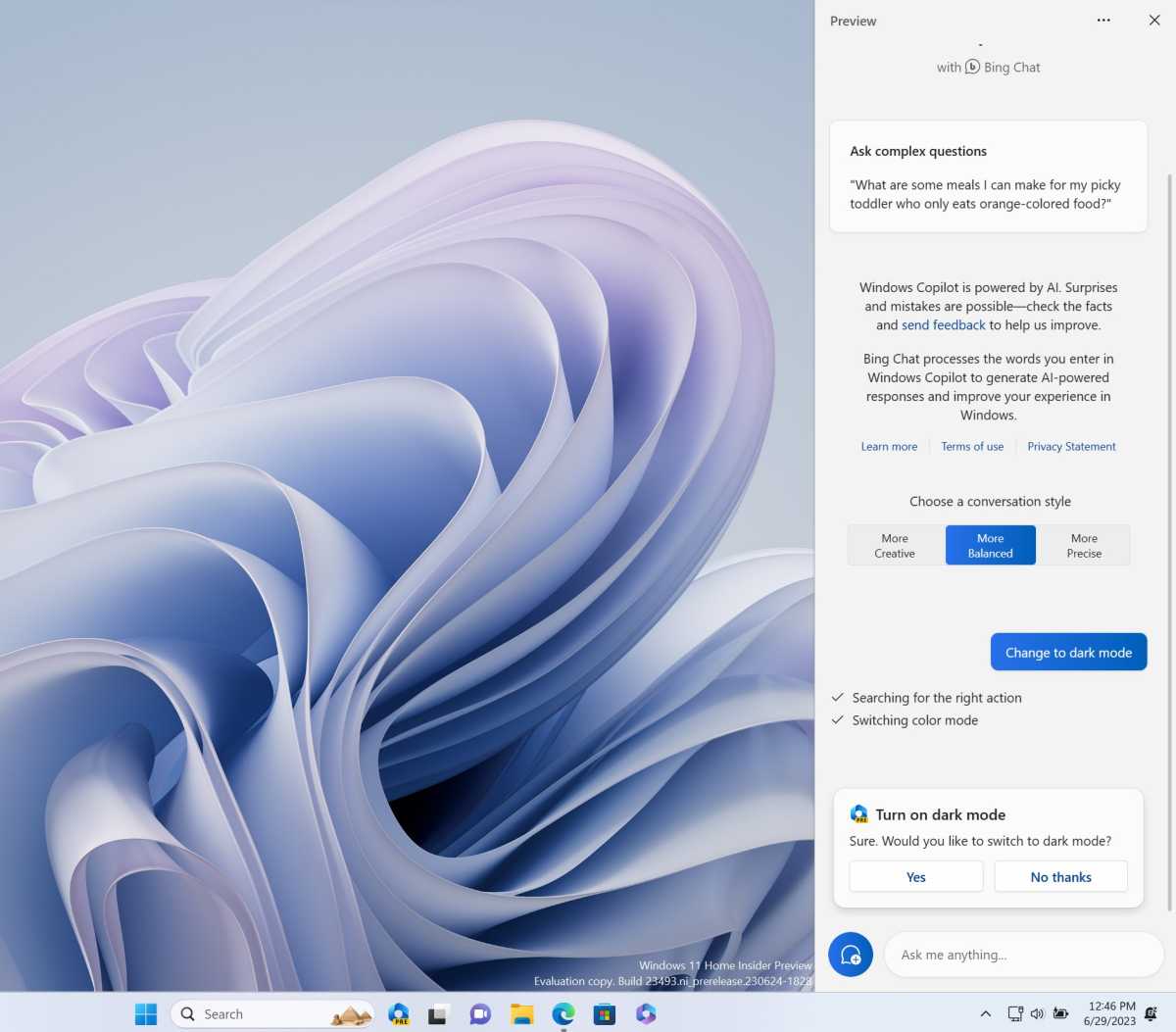
Windows Latest
The sidebar provides quick access to the Bing Chat interface that many of us should be familiar with by now. But instead of just generating new information, it will be possible to control almost every Windows 11 setting via Copilot. There will also be a number of integrations with Microsoft 365 apps.
Here’s a look at the new “Gallery” section of File Explorer:
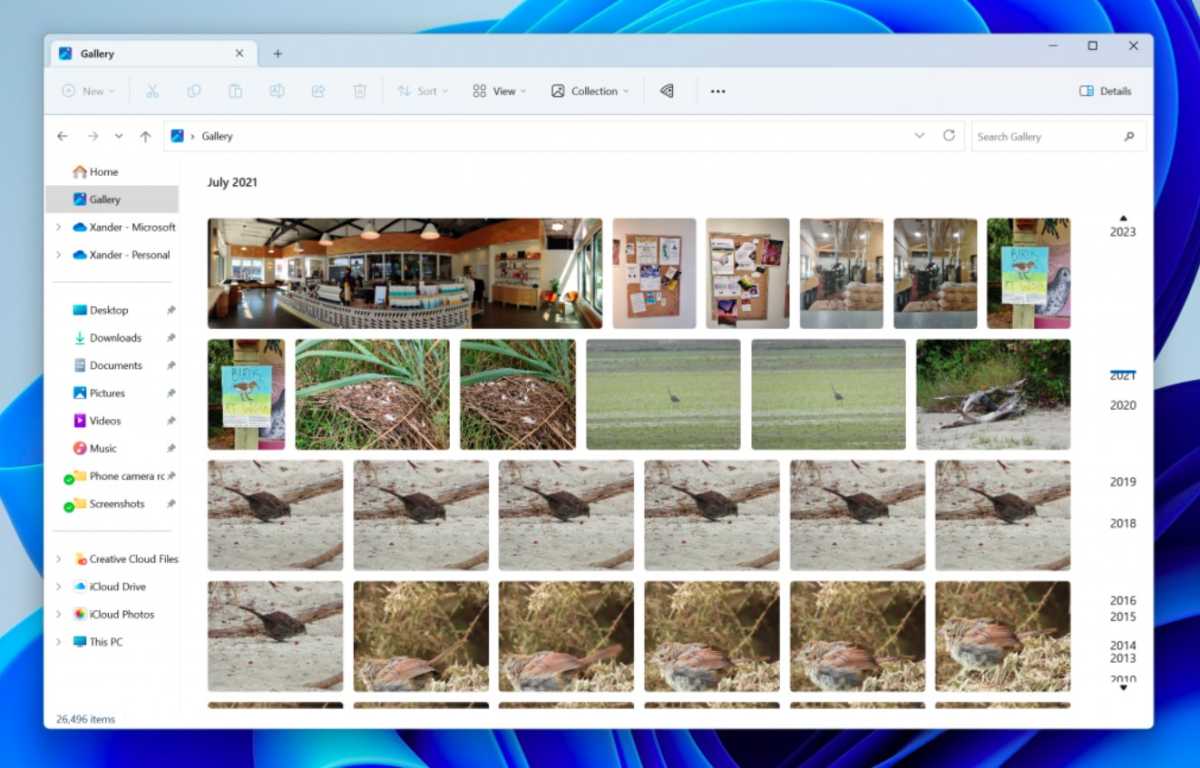
Microsoft
Artificial intelligence will be an important part of Windows in the coming years, and we expect it to play an important role in Windows 12. Windows 12 could launch as early as next year.
Similar articles
Note: This article first appeared on our sister publication Techadvisor and has been translated into German
