
It was in the context of the Google I/O 2021 event that the American company launched a new privacy option for its users. This gives you the ability to quickly remove the last 15 minutes of activity from your Google account.
Now is the time to finally release this option for all users. As announced by Google, this feature integrates the latest Google app update for Android and iOS.
How to delete your most recent history
- Open the Google app on your Android or iOS smartphone
- Click on your profile picture in the top right corner
- Download “Delete last 15 minutes”
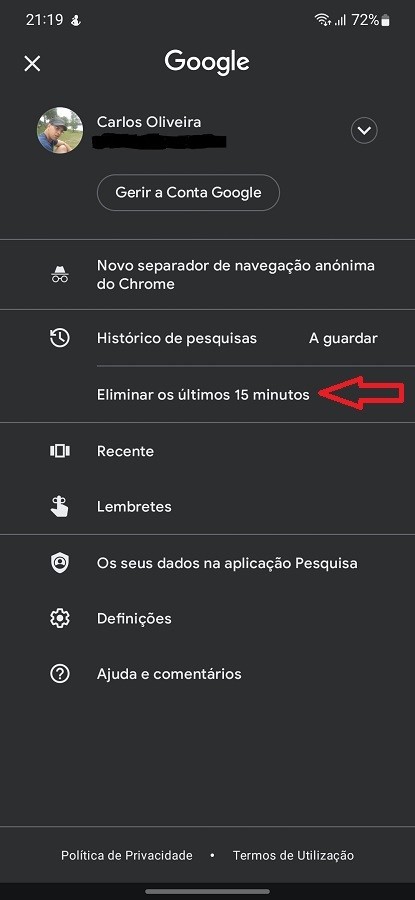
As you can see, it is a simple and very intuitive process. After following the steps outlined above, the last 15 minutes of activity on the Google account will be deleted.
History deletion will affect all platforms on which you use this service. That is, all your data will disappear from your smartphone, Google Chrome and Chromebook.
It is important to emphasize that this operation will have to be done on your smartphone, since it is not available in Chrome. In addition, you will only find this option in the Google application, that is, it will not appear in Google Discover or in any other American service.
This option saves the user from having to navigate the depths of Google account settings. The new option is clearly visible and with just one click, the most recent account activity data is quickly deleted.
As Google mentions, this is an option that is being implemented gradually. If you still can’t find this option on your device, you just have to wait a little longer.